Score a game
Open the score sheet, start the game live, enter period scores and each player's line, and save it as final so standings and stats update.
Updated · In the admin: Schedule & scores
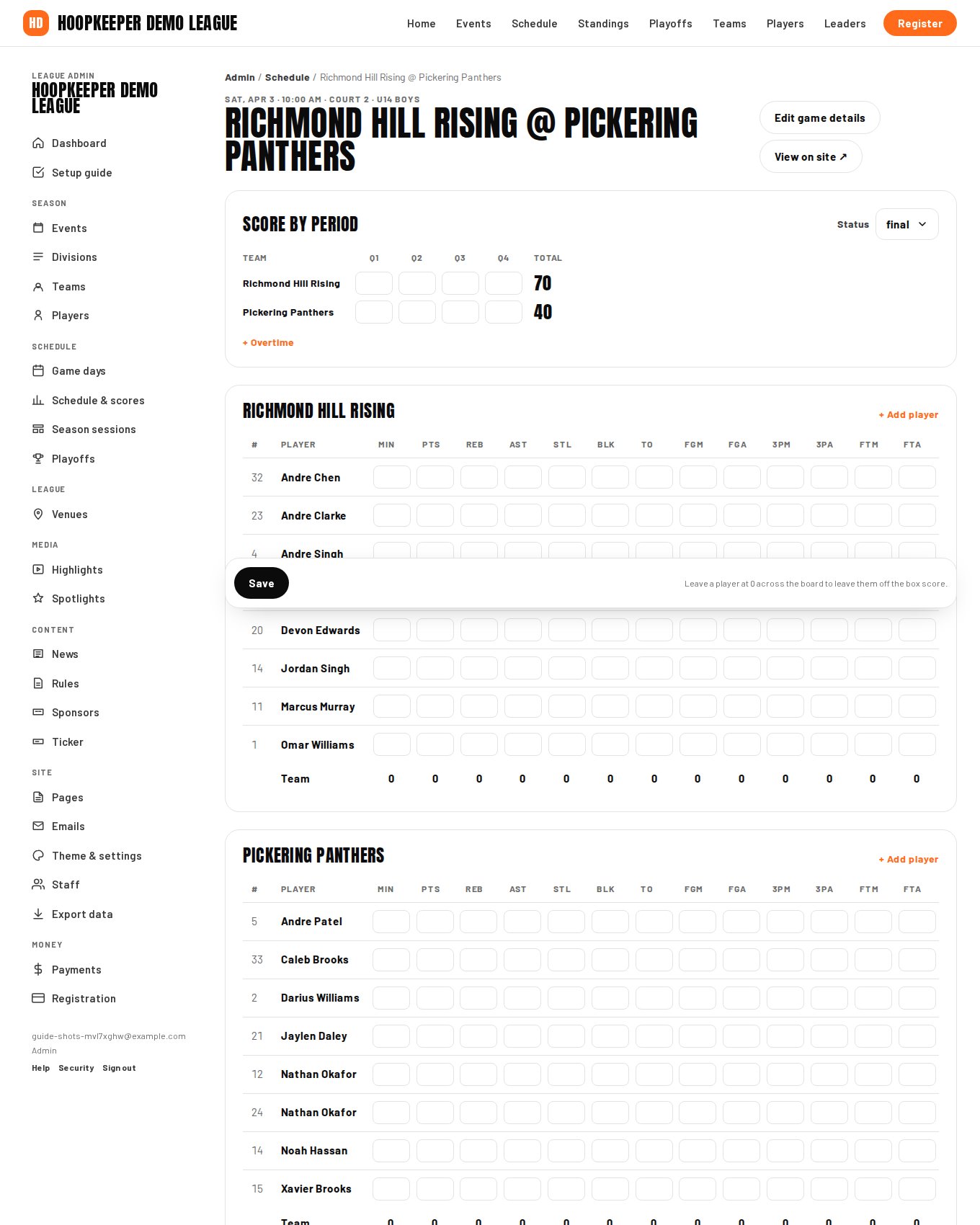
Every game has a score sheet: the team scores by period, and a box score line for every player on both rosters. Saving it as final is what moves the standings, the player stats and the leaders board. This guide is for the scorekeeper at the table.
Open the score sheet
- Sign in and go to Manage › Schedule & scores. Use the game day or division filter to find today's games.
- Press Score sheet on the game. Both teams must be set on the game before it can be scored; if one is missing, an admin edits the game first.
Start the game live
Press Start game (live) at tip-off. The game shows as live on the public site and leads the ticker, and a Q3 4:12 style field appears for the period and clock, which the ticker shows beside the score. Update it when you can; it is a courtesy for people following from home, not a requirement.
Score by period
Enter each team's points per period under Q1 to Q4. The Total column adds them up. Press + Overtime to add OT, OT2 and so on, and Remove last period to take an unused one away. If your league does not track periods, enter the whole score in one period.
Player lines
Each team's roster is listed with a column per stat:
| Column | Stat |
|---|---|
| MIN | Minutes played |
| PTS | Points |
| REB | Rebounds |
| AST | Assists |
| STL | Steals |
| BLK | Blocks |
| TO | Turnovers |
| FGM / FGA | Field goals made and attempted (threes included) |
| 3PM / 3PA | Three-pointers made and attempted |
| FTM / FTA | Free throws made and attempted |
Type into the cells as the game goes, or fill them in from a paper sheet afterwards. The team totals under each roster are a check against the period scores. A player left at 0 across the board is left off the box score, so there is nothing to do for players who did not dress. A player who is not listed is not on the roster: an admin adds them under Players.
Save
- Save keeps everything entered so far and leaves the status as it is. Use it during the game and between quarters.
- Save as final saves and sets the game to final. The standings, both teams' records, the player stats and the leaders board update at once, and the result goes to the ticker and the home page.
Both buttons stay at the bottom of the screen on a phone.
Fixing a mistake
Open the score sheet again, change the numbers, and press Save. A final game stays final; standings and stats recalculate from the new numbers.
Forfeits and defaults
Enter the forfeit score your rules specify in a single period, leave every player at 0, and save as final. The result counts in the standings and no player stats are affected.
Questions
Do I have to enter every stat?
No. Period scores alone are enough for standings. Enter the player lines your league tracks; a league that only keeps points can fill PTS and leave the rest at 0. A player left at 0 across the board is left off the box score.
Can I fix a score after saving it as final?
Yes. Open the score sheet again, change the numbers and press Save. Standings and stats recalculate. For a playoff game, press Update from scores on the bracket afterwards.
Does it work on a phone?
Yes. The score sheet is built for a phone or tablet at the table, with the Save buttons pinned to the bottom of the screen.
Try it on a sample league
A seven-day test drive comes with a season already loaded, so you can follow this guide click for click.
Start a free test drive