Create a season or tournament
Events hold everything in a season: dates, the registration window, the team fee and deposit, the flyer, and the sessions and phases the public page shows.
Updated · In the admin: Events, Season sessions
An event is a season, a tournament, a camp or a clinic. It groups the divisions, teams, games and registrations that belong together, and it has its own public page at /events/your-event. Most leagues create one event per season.
Create the event
- Go to Manage › Events and press + New event.
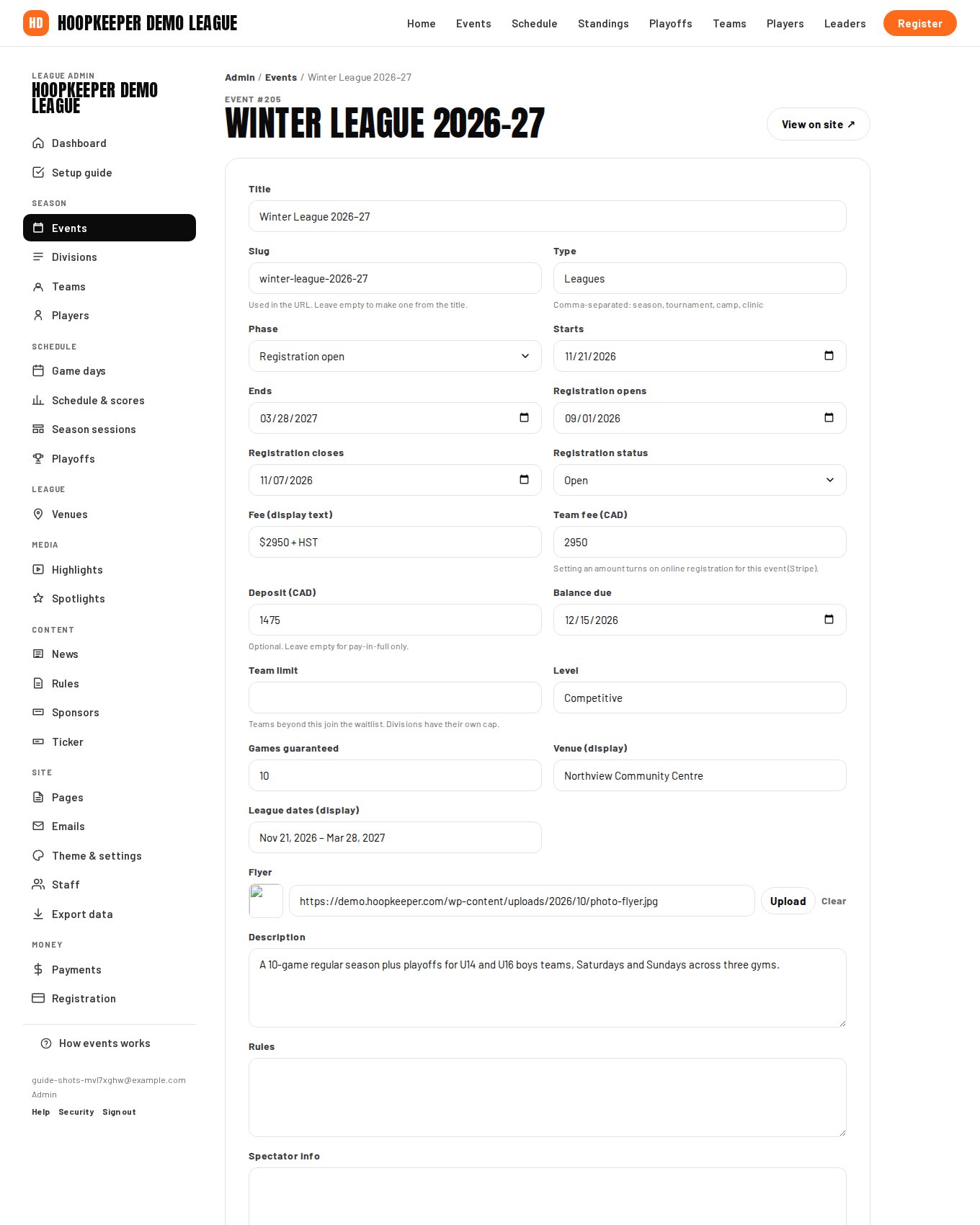
- Give it a Title such as "Winter League 2027". The Slug becomes the URL; leave it empty to make one from the title.
- Set the Type (season, tournament, camp or clinic, comma-separated when it is more than one) and the Level, for example Competitive or Rec.
- Enter Starts and Ends. These drive the phase, the order on the Events page and the season sessions below.
- Enter Registration opens and Registration closes. Registration flips to Closed once the closing date has passed and opens on the opening date when no status is set by hand.
- Save. The event appears on the public Events page right away; nothing else is needed for a schedule-only league.
Fees, deposits and the team limit
- Fee (display text) is what the public page prints, such as "$2,950 + HST per team".
- Team fee (CAD) is the amount charged at checkout. Setting it turns on online registration for this event as soon as Stripe is connected (see the payments guide).
- Deposit (CAD) is optional. With a deposit, a coach can choose to pay the deposit now and the balance later; leave it empty for pay-in-full only.
- Fee is plus HST (on the setup guide's event step) adds tax on top of the fee at checkout; untick it when the fee you entered already includes tax.
- Balance due is the date the balance must be paid by. Balance reminders count back from it.
- Team limit caps the event. Teams beyond it join the waitlist instead of paying. Each division has its own cap as well.
- Games guaranteed, Venue (display) and League dates (display) are plain text for the public page: "10 games plus playoffs", "Northview Community Centre", "Sundays, Jan 11 – Mar 29".
Flyer, description, rules and spectator info
Upload a Flyer and it becomes the hero image of the event page and the home page while the event is current. Description is the body of the event page. Rules and Spectator info are shown in their own sections, and the rules text is what a coach agrees to on the registration form when the league has no separate rules page.
Season sessions
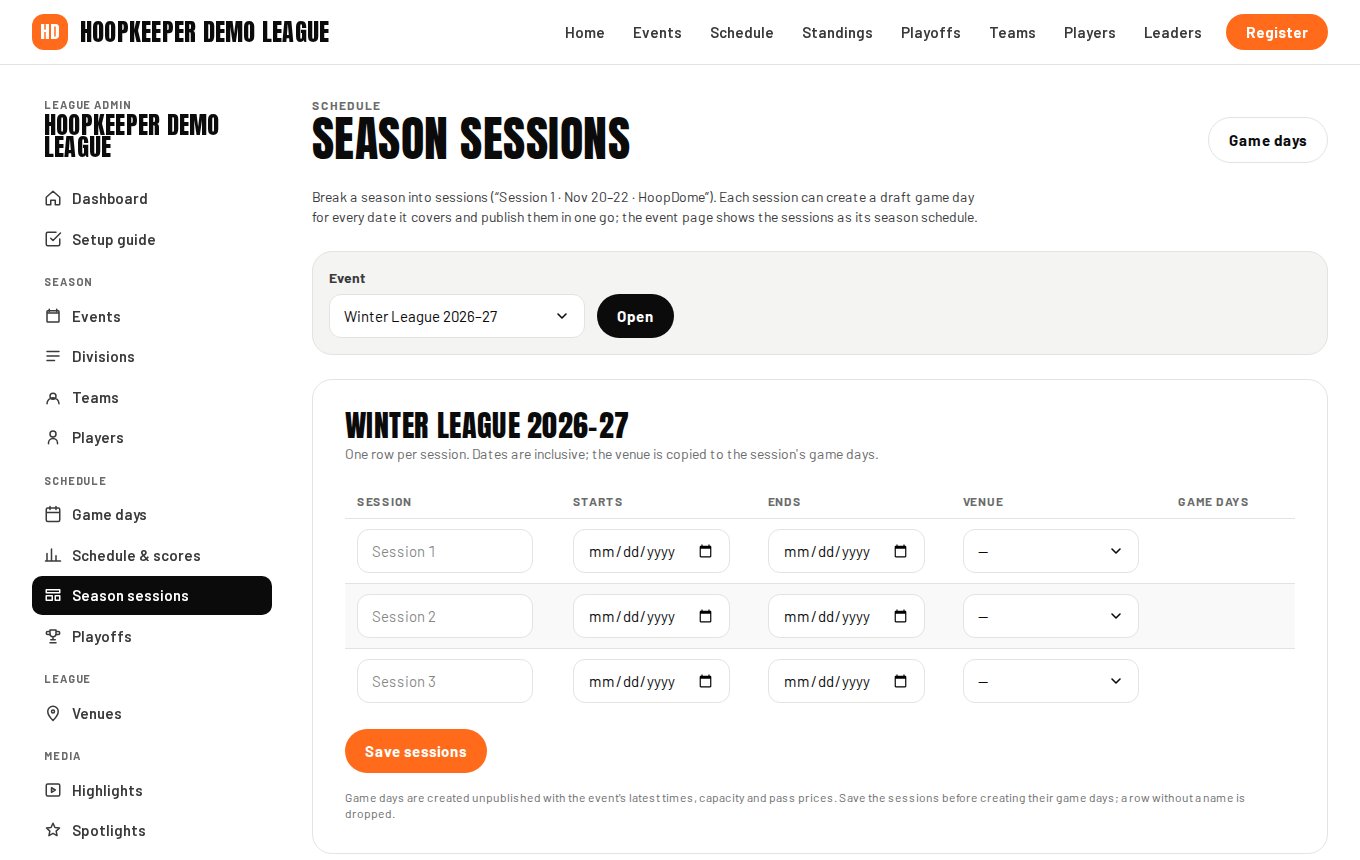
Long seasons often run in blocks: Fall session, Winter session, with a different gym for each. Manage › Season sessions adds those blocks to an event.
- Pick the event and press Open.
- Add a row per session: a name, start and end dates (inclusive) and a venue. Save sessions.
- Press Create missing on a session (or Create missing game days for every session) and HoopKeeper creates a draft game day for every date in the session that does not already have one, with the event's latest times, capacity and pass prices.
- Review the drafts under Game days, then press Publish on the session or Publish all drafts.
The event page lists the sessions with their dates and venues, which saves writing them out in the description.
Phases and order
Every event has a Phase: Registration open, Coming soon, In progress or Completed. The phase decides the label on the Events page and which event the home page leads with. Phases roll over nightly from the dates, and Update phases now under Season sessions applies the rule immediately. Sort order (lower first) breaks ties between events in the same phase.
Editing and deleting
Open any event from the list to edit it. Delete at the bottom of the form removes the event itself; divisions, teams and games that point at it are kept, so delete those first if you really want everything gone. A finished season is better left as Completed: its results, standings and player stats stay on the site.
Questions
What is the difference between Fee and Team fee?
Fee is display text shown on the event page, such as "$2,950 + HST per team". Team fee (CAD) is the amount HoopKeeper charges at checkout; setting it turns on online registration for the event once Stripe is connected.
Can one event have several divisions?
Yes. Divisions are separate records; each team is placed in a division and an event. Standings and schedules are per division, so a Winter League event with U15 Boys and U17 Girls divisions keeps them apart.
Do I have to set the phase by hand?
No. Every night each event's phase is set from its dates: Registration open while registration is open, Coming soon, In progress from the start date and Completed after the end date. You can set it by hand for an event without dates, or press Update phases now under Season sessions.
Try it on a sample league
A seven-day test drive comes with a season already loaded, so you can follow this guide click for click.
Start a free test drive