Set up your league site
Name, logo, colours, hero image, contact links, which features show, your own domain, and taking the site live.
Updated · In the admin: Theme & settings
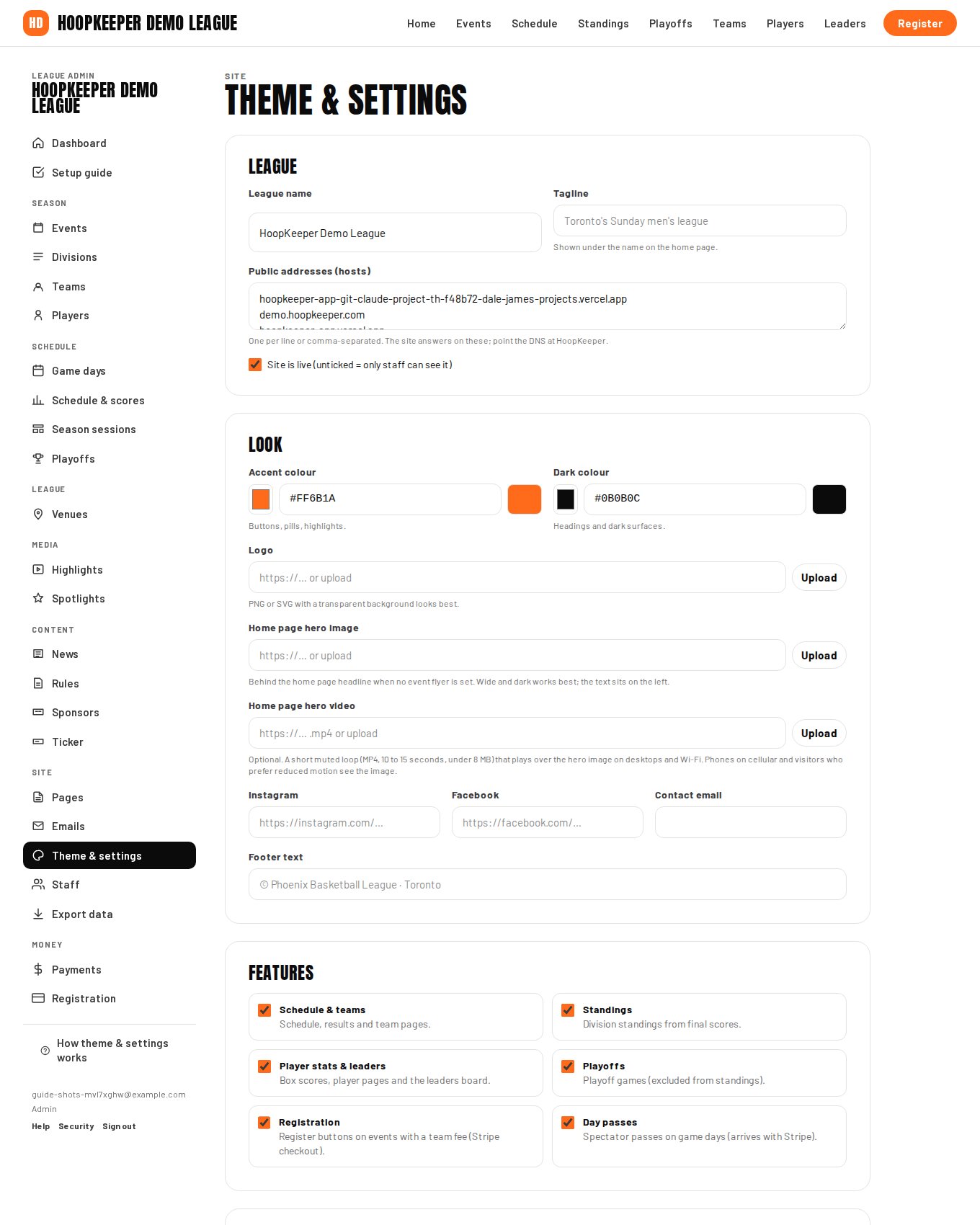
Everything a visitor sees first, the name in the header, the logo, the colours and the home page hero, is set on one screen: Manage › Theme & settings. The setup guide fills the basics on your first visit; come back here to change them any time.
Name, tagline and addresses
- League name is used in the header, the page titles, emails and the footer.
- Tagline is one line under the name on the home page, for example "Toronto's Sunday men's league".
- Public addresses (hosts) lists every address the site answers on, one per line. A new league starts on its HoopKeeper address; add your own domain here once its DNS points at HoopKeeper.
- Site is live controls who can see the public pages. Unticked, only signed-in staff can see them, which is how a league stays hidden while it is being set up.
Look
- Accent colour is used for buttons, pills and highlights. Pick it from your logo.
- Dark colour is used for headings and dark surfaces. Keep it close to black so text stays readable on it.
- Logo: upload a PNG or SVG with a transparent background. Without one the site shows the league's initials in the accent colour.
- Home page hero image sits behind the home page headline when no event flyer is set. Wide and dark works best, because the headline sits on the left.
- Home page hero video is optional: a short muted loop (MP4, 10 to 15 seconds, under 8 MB) plays over the hero image on desktops and Wi-Fi. Phones on cellular, and visitors who prefer reduced motion, see the image instead.
Contact and social links
Instagram, Facebook, Contact email and Footer text fill the footer of every page. The contact email is also the default reply-to address for league emails, so coaches' replies land somewhere a person reads.
Features
Tick the parts of the site your league uses. Each one adds or removes its pages and menu items on the public site:
| Feature | What it shows |
|---|---|
| Schedule & teams | Schedule, results and team pages |
| Standings | Division standings from final scores |
| Player stats & leaders | Box scores, player pages and the leaders board |
| Playoffs | Playoff brackets (playoff games are kept out of standings) |
| Registration | Register buttons on events with a team fee |
| Day passes | Spectator passes on game days, sold through Stripe |
A league that only publishes a schedule and results can switch off stats and playoffs and the site gets simpler.
Leaders & rankings and two-step verification
The same screen holds the qualifying rules for the leaders board (minimum share of team games and minimum attempts for shooting percentages) and the Require two-step verification for owners and admins switch. The stats settings guide and the staff guide cover both.
Taking the site live
- Finish the setup guide, or at least the name, logo and colours.
- Remove the sample season from the Publish step of the setup guide, so visitors never see placeholder teams.
- Tick Site is live and save.
- Open your public address in a private browser window to see it the way a visitor does.
Changes on this screen are live as soon as you save, so if you are redesigning mid-season, do it in one sitting.
Questions
What size should the logo be?
A PNG or SVG with a transparent background, at least 400 pixels on its long side. It is shown in the header, on emails and on social cards, so a simple mark reads better than a wide wordmark with fine detail.
Can I use my own domain?
Yes. Add the domain under Public addresses, then point its DNS at HoopKeeper. The site answers on every address listed; www and the bare domain can both be added.
Why can't visitors see my site?
Until Site is live is ticked, only signed-in staff can see the public pages. The Publish step of the setup guide ticks it; so does the checkbox at the top of Theme & settings.
Try it on a sample league
A seven-day test drive comes with a season already loaded, so you can follow this guide click for click.
Start a free test drive