Custom pages and the rules page
Build extra pages with the block editor (text, images, buttons, video, live league data), add them to the site menu, and publish your league rules with a downloadable flyer.
Updated · In the admin: Pages, Rules
Most of a league site is generated from the season, but every league needs a few pages of its own: about us, sponsorship, FAQ, a code of conduct. Pages builds them from blocks; Rules is a dedicated page with sections and a flyer.
Create a page
- Go to Manage › Pages and press + New page.
- Enter the Page title and a Slug. The page lives at /p/your-slug.
- Add blocks (below), then press Save. Preview opens the page as a visitor would see it.
- Press Publish when it is ready. Show in site menu adds it to the header; Menu order (lower first) places it.
- Delete page removes it after a confirmation.
The blocks
| Block | What it does |
|---|---|
| Heading | A section title |
| Text | Paragraphs with bold, italic, links and lists. A blank line starts a new paragraph |
| Image | Upload or paste a URL, with alt text and an optional caption |
| Button | A call to action; pick Accent, Outline or Neutral and a link such as /events or a full address |
| Callout | A highlighted note |
| Two columns | Text side by side |
| Video / embed | YouTube, Vimeo or any embeddable URL |
| League data | Live standings (all divisions), upcoming games, scoring leaders, the team grid or the events list |
| Divider | A thin line |
Blocks can be moved up and down and removed. A page's Content width can be the normal column or Full width for a wide table or image.
The rules page
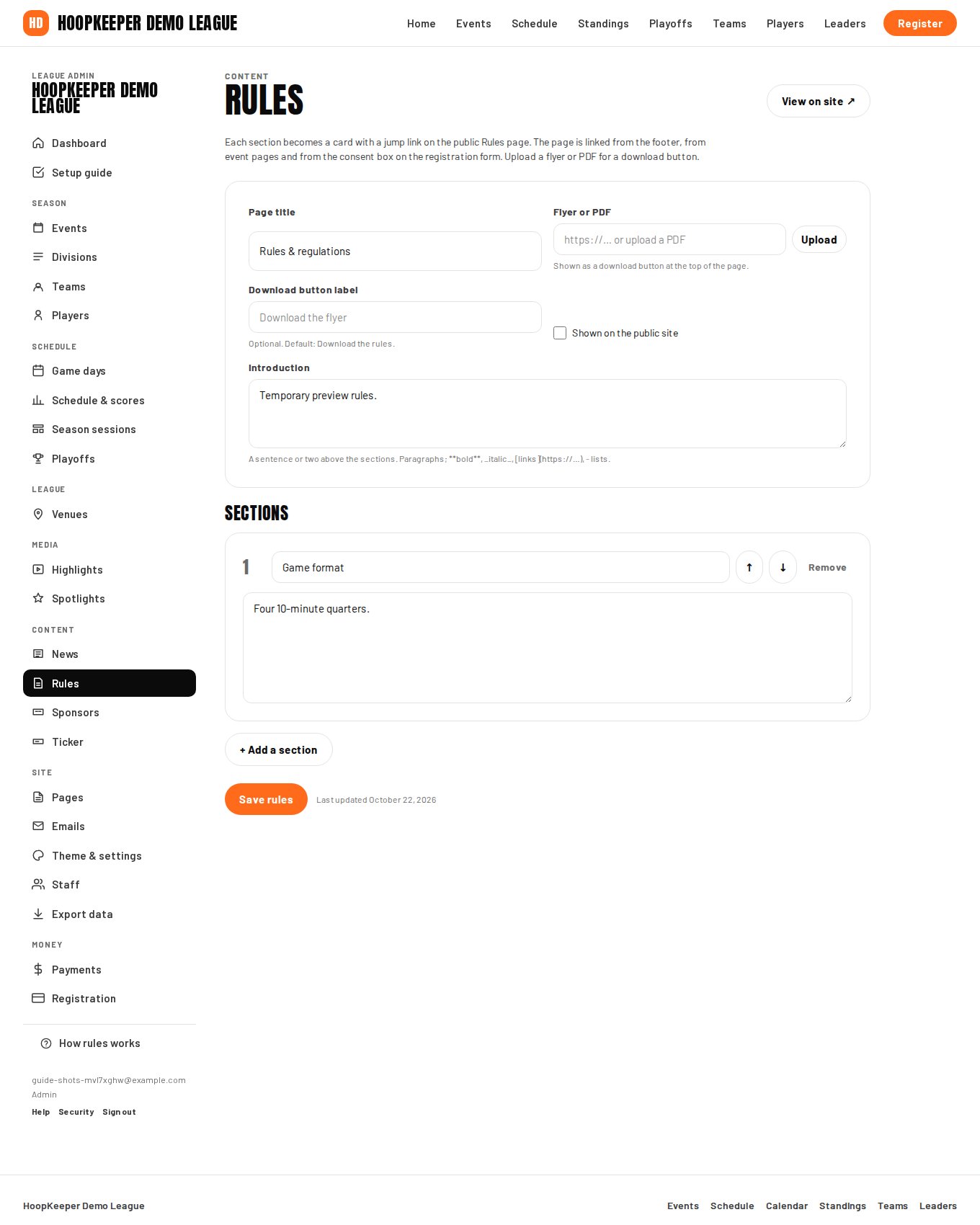
Manage › Rules builds the public /rules page, which is linked from the footer, from event pages and from the consent box on the registration form.
- Set the Page title and write an Introduction: a sentence or two above the sections.
- Upload a Flyer or PDF and it becomes a download button at the top of the page; set the Download button label if "Download the rules" does not fit.
- Add a section for each topic: game format, eligibility, uniforms, conduct, playoffs. Each section has a title and its text, becomes a card on the page, and gets a jump link at the top. Move up and Move down reorder sections; Remove deletes one.
- Press Save rules. The page is live as soon as it is saved and has at least one section.
Which to use
- Rules of play, eligibility, conduct: the Rules page, because registration links to it.
- Anything else, from "About the league" to a sponsorship deck: a custom page, in the menu or shared by link.
- Something that changes weekly: a news post instead.
Questions
Where do custom pages live?
At /p/your-slug on your league site. Tick Show in site menu to add the page to the header; unticked, it is reachable by its link only, which suits a page you share with coaches.
Can a page show live standings?
Yes. Add a League data block and pick Standings, Upcoming games, Scoring leaders, Team grid or Events. It updates by itself as the season runs.
Do coaches have to accept the rules?
When a rules page is published, the registration form links to it in the consent box the coach must tick. Without a rules page, the event's own Rules text is used.
Try it on a sample league
A seven-day test drive comes with a season already loaded, so you can follow this guide click for click.
Start a free test drive